
How to Check Facebook UID Live Status, 2FA Codes & Cookie Formats
Practical guide to checking whether a Facebook UID is live or disabled, generating 6-digit TOTP 2FA codes locally, converting JSON/Netscape Cookie formats, and organizing bulk account lines safely.
Before logging a team member into any Facebook profile or handing over assets, run three quick local checks: verify whether the UID is still live, confirm the 2FA secret generates a valid 6-digit code, and validate any Cookie or credential formatting locally without uploading secrets to unknown servers.
How does a Facebook UID live check work—and what are its limits?
A public Facebook UID live check queries whether a profile's public avatar endpoint still returns an active image dimension (height) for a given numeric User ID (1000...).
- Live: The profile resolves publicly and returns standard avatar metadata—meaning the profile exists and has not been globally removed.
- Disabled / Unavailable: The endpoint returns an invalid-ID or unavailable response, which commonly indicates a suspended, deleted, or locked profile.
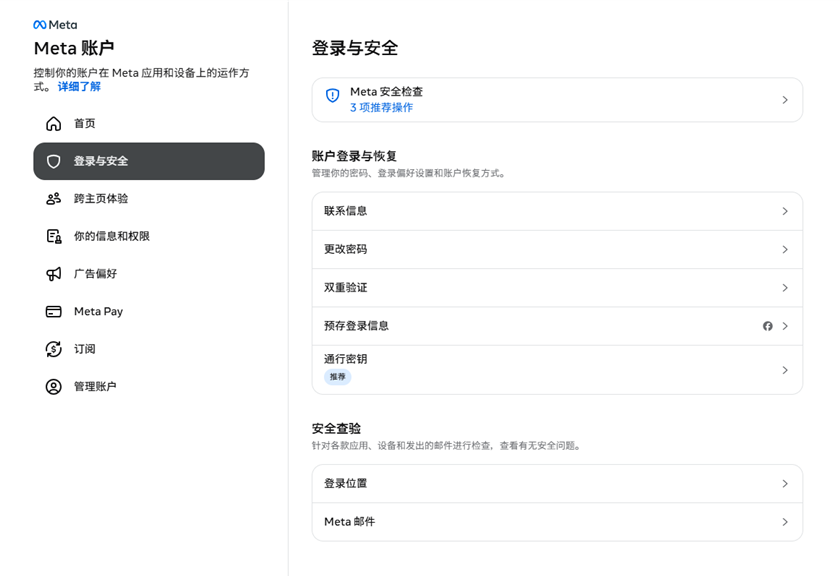
- Important limitation: Public UID checks cannot see inside private account settings, advertising restrictions, or checkpoint prompts. After logging in, always open Meta Accounts Center → Password and security and Business Support Home to confirm true ad readiness.
You can check up to 30 UIDs directly from your own browser (with zero UIDs sent to WuYoo's server) using our free Facebook UID Live Checker.
How do you generate Facebook 2FA codes safely without losing access?
Facebook two-factor authentication uses standard TOTP (RFC 6238)—a 6-digit numeric code computed from your Base32 secret key and the current 30-second UTC window.
- Extract the Base32 secret: A valid TOTP key contains only letters
A–Zand digits2–7(typically 16 or 32 characters, often the last segment of an account string orsecret=inside anotpauth://URI). - Generate locally in your browser or authenticator app: Paste the key into our browser-local 2FA Code Generator—nothing is transmitted over the network or saved to browser storage.
- Fix "code invalid" errors by checking device time: Over 80% of TOTP mismatches happen because a computer or phone clock drifted by more than 30 seconds. Enable Set time automatically in your OS settings and retry.
- Save recovery codes before changing phones: Inside Accounts Center → Password and security → Two-factor authentication, store backup recovery codes offline before wiping an old device.
How do you convert and validate Facebook Cookie formats safely?
Different browser extensions and multi-profile browsers expect different Cookie structures—pasting the wrong format causes immediate import failures.
| Cookie Format | Typical Appearance | Where It Is Used |
|---|---|---|
| JSON Array | [{"name":"c_user","value":"...","domain":".facebook.com"}] |
Cookie-Editor, EditThisCookie, AdsPower, BitBrowser, MoreLogin |
| Header String | c_user=1000...; xs=...; datr=...; sb=...; fr=... |
Quick delivery lines, HTTP headers, lightweight importers |
Netscape (cookies.txt) |
Tab-separated 7-column lines starting with .facebook.com |
CLI scripts, archival backups, legacy browser tools |
Use our browser-local Facebook Cookie Converter & Validator to convert between JSON, Header String, and Netscape formats instantly, extract the c_user UID in one click, check whether core session fields (c_user, xs, datr, sb) are present, and spot expired timestamps—100% locally in your browser with zero uploads.
How do you split or clean bulk account lines quickly?
When working with multi-column team delivery lists (UID|Password|2FA|Email|EmailPass|Cookie), manually copying columns one by one invites mistakes. Our browser-local Account Text Formatter & Extractor detects common delimiters (|, ----, :, ;, Tab, ,), removes duplicates, extracts all UIDs for the UID Live Checker or all 2FA secrets for the 2FA Generator, and exports clean TXT/CSV files locally.
Looking for properly verified profiles to pair with your workflow? Compare our Aged Facebook Accounts, ID-Verified Profiles, and Facebook Accounts with Pages.
Official Meta References
Verified against Facebook Help Center and IETF standards (2026-11-27):
Platform rules and screens change over time. For appeals, verification and similar steps, follow the latest guidance in the Facebook Help Center and Meta Business Help Center.
- Aged Durable FB Accounts (6+ Months)Real-person Facebook accounts with random friends, registered 6+ months ago, ¥50 each
- Verified accountsPersonal profiles that have completed phone, selfie video or ID verification
- Durable FB Accounts (Under 3 Months)Real-person Facebook accounts with random friends, registered within 3 months, ¥30 each
- Accounts with a PagePersonal profiles that already manage a Page, delivered together with it