
Facebook Agency Ad Accounts Explained: Cost Models, Limits & Setup
Learn how Meta agency ad accounts work, typical agency fee structures, how they differ from standard BM ad accounts, and what compliance checks teams should verify before onboarding.
A Facebook agency ad account (an ad account provisioned through a Meta-authorized media partner or agency) is an ad account owned inside an agency's Business Portfolio and shared into your team's Business Manager so you can run campaigns at higher scale, use credit-line or agency billing, and access partner-level review support. It runs the exact same Meta ad auction as a regular ad account—the real differences are ownership, billing structure, daily spending limits, and onboarding verification.
How does a Facebook agency ad account differ from a regular BM ad account?
The core difference lies in who owns the ad account, how billing is settled, and how Meta assigns initial daily spending limits.
| Comparison Item | Personal Ad Account | Standard BM Ad Account | Agency Ad Account |
|---|---|---|---|
| Created by | Individual Facebook profile | Your own Business Portfolio (BM) | Meta-authorized agency / partner |
| Asset ownership | Tied to one personal profile | Owned by your Business Portfolio | Held by the partner BM, shared to your BM |
| Daily spend limit | Usually starts low on new accounts | Scales up with compliant spend history | Typically configured with higher or credit-line limits |
| Billing method | Personal card or local payment method | Card / PayPal linked to your BM | Partner invoicing, top-up balance, or monthly credit line |
| Best fit for | Solo testing and small budgets | Most cross-border e-commerce & SaaS teams | Scaling campaigns needing higher limits and corporate compliance |
If you want to compare the full asset bundle typically paired with agency setups, review our Facebook Agency Ad Accounts overview and Shared Ad Accounts configuration.
What are the typical cost and fee structures for an agency ad account?
Meta itself does not publish a fixed retail fee for agency ad accounts—actual onboarding costs depend on the partner's settlement model, ad spend volume, vertical compliance requirements, and currency. Across the market, teams generally encounter four billing structures:
- Ad-spend percentage fee: The partner charges a percentage on top of monthly ad spend or top-ups; rates vary with spend tiers and industry risk.
- Flat monthly retainer or seat fee: Common for predictable mid-scale media teams that prefer fixed overhead rather than percentage-based commissions.
- Minimum top-up or deposit requirement: Because agency accounts often sit on a monthly credit line, partners usually require an upfront ad balance transfer before activating campaigns.
- Zero-fee rebate arrangements: Usually reserved for large direct-to-consumer or gaming advertisers meeting strict quarterly spend commitments directly with an authorized reseller.
Because settlement terms and eligibility vary widely by vertical, domain, and target geo, WuYoo confirms exact configuration terms directly with an advisor rather than listing generic estimates.
What should you verify before running campaigns on an agency ad account?
Check four technical and policy items before launching your first campaign: asset sharing permissions, timezone and currency lock, regional advertiser verification, and Pixel ownership.
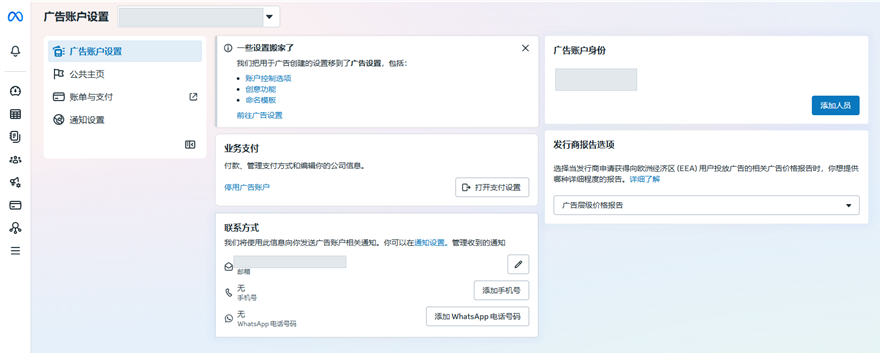
- Confirm Business Portfolio sharing: In Meta Business Suite under Settings → Accounts → Ad Accounts, verify that the shared ad account appears under your Business Portfolio and that your media buyers have explicit access permissions.
- Lock timezone and currency before launch: Per Meta documentation, changing an ad account's timezone or currency closes the original account and creates a replacement; currency edits are restricted and unavailable on monthly-invoicing accounts.
- Keep your Pixel (Dataset) in your own BM: Never store your core conversion dataset exclusively inside a third-party ad account. Keep your Pixel inside a Verified Business Manager you control and share asset access to the ad account so conversion history survives any account swap.
- Complete regional advertiser disclosure early: Targeting audiences in Taiwan, Singapore, or the European Union (under the EU Digital Services Act) requires beneficiary and payer disclosure under Ad Settings → Verification and Ad Disclosures before ads can publish.
When is a standard Verified BM or spent ad account a better fit?
If your daily budget is still in the testing phase or you want 100% direct ownership of billing cards and ad accounts inside your own Business Portfolio, starting with a Verified Business Manager or an Ad Account with Spend History is often simpler than full agency onboarding.
To understand how BM slot limits (BM1, BM3, BM5) work alongside agency accounts, read our Facebook Business Manager & Verified BM Guide. You can also verify BM IDs with our Facebook BM Checker and standardize campaign attribution links with Meta dynamic parameters using our browser-local Facebook Ads UTM Builder.
Frequently Asked Questions
Does an agency ad account make campaigns immune to Meta policy reviews?
No. Every ad submitted from an agency ad account goes through the same Meta Advertising Standards, landing-page checks, and automated review systems. Policy violations, misleading claims, or broken landing pages will still cause ad rejections or account disablement.
Can an agency ad account share audiences and Pixels across multiple ad accounts?
Yes, provided your Business Portfolio holds the dataset and grants partner or asset access to the shared ad account. Keeping Pages, Pixels, and catalogs inside your own Business Manager makes switching ad accounts significantly cleaner.
What happens if an agency ad account hits a spend cap or pauses unexpectedly?
First check whether an Account Spending Limit (a manual cap in Billing & Payments) was reached rather than a restriction. See our Facebook Ad Account Restricted & Spending Limit Checklist for step-by-step diagnosis.
Official Meta References
Verified against Meta Business Help Center documentation (2026-11-27). Industry naming such as "agency ad account" and "spent ad account" reflects market terminology; platform behavior follows official Meta documentation:
Platform rules and screens change over time. For appeals, verification and similar steps, follow the latest guidance in the Facebook Help Center and Meta Business Help Center.
- Agency / enterprise ad accountsAd accounts opened through Meta-authorised agencies, with documents and supporting assets prepared together
- Shared ad accountsAd accounts created in a provider's BM and shared into your own BM
- Accounts with spend historyFacebook ad accounts that already have spending and payment records
- Verified business BMBMs that have completed Meta business verification, for businesses that need a company identity