
Facebook Ad Account Restricted? 2026 Quick Fix & Diagnosis Checklist
Step-by-step checklist when Facebook advertising access is restricted: separate profile, Page, BM and ad account blocks, fix spending limits, and complete Taiwan, Singapore & EU verification.
When Meta blocks your ads with "Your advertising access is restricted" or pauses delivery unexpectedly, do not click Appeal blindly. Open Business Support Home first and identify which of the four layers is actually blocked—your personal profile, your Facebook Page, your Business Portfolio (BM), your ad account, or simply a missed regional verification or Account Spending Limit.
How do you tell which layer is restricted in Meta Business Support Home?
Meta enforces restrictions independently across four separate layers, and each requires a different fix.
| Layer Affected | What You See in Business Support Home | Practical Fix Path |
|---|---|---|
| Personal Profile | Profile flagged; Pages and BM remain green | Complete identity confirmation if prompted, or switch operations to another healthy Full Control admin inside the BM |
| Facebook Page | Page shows advertising restriction; ad account is healthy | Remove non-compliant posts and request review; if marked Final Decision, detach the Page and launch a clean backup Page |
| Ad Account | Only one ad account is disabled | Audit rejected ads, landing page policies, and billing failures before requesting a single structured review |
| Business Portfolio (BM) | Entire BM disabled from advertising | Verify business documents under Security Center and submit official Business Verification appeal |
Before touching any asset, you can also check whether linked personal UIDs or BM IDs remain live using our Facebook UID Live Checker and Facebook BM Checker.
Could your ads be paused by an Account Spending Limit instead of a restriction?
Yes—one of the most common false alarms is an Account Spending Limit (an optional lifetime cap set by an admin in Billing & Payments), which halts every active campaign without triggering any policy violation.
Open Ads Manager → Billing & Payments → Payment Settings and inspect the Account Spending Limit box. If current spend matches the configured cap, update or reset the limit and campaigns resume delivery automatically.
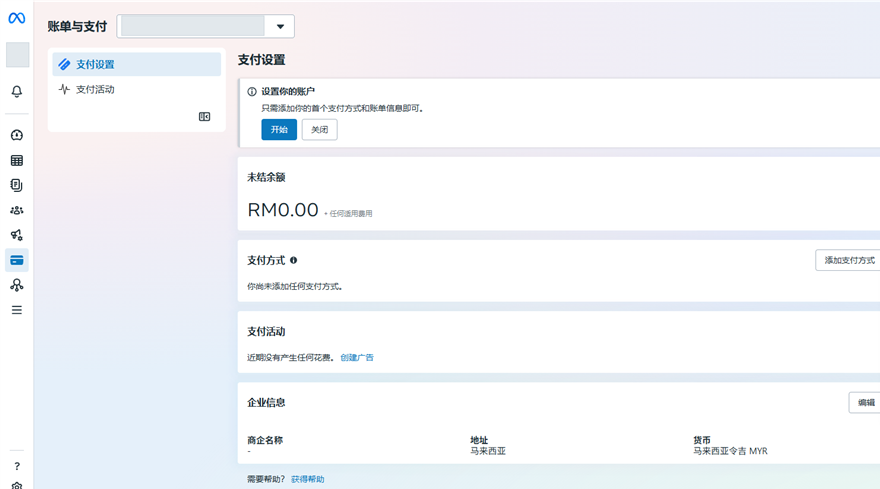
If your team specifically evaluates ad accounts by daily spend caps, review our Spend-Limit Ad Accounts and BM Ad Accounts configuration pages.
Did a 2026 regional advertiser verification rule block your ad set?
If your ad account shows green in Business Support Home yet new ad sets targeting Taiwan, Singapore, or the European Union refuse to publish, Meta's unified Verification and Ad Disclosures rule is likely blocking publication.
In 2026, Meta consolidated regional verification under Ads Manager → Ad Settings → Verification and Ad Disclosures (under Creating ads). Check whether your target market requires:
- Taiwan & Singapore (all targeted audiences): Mandatory identity/organization verification of both Beneficiary and Payer, then setting a verified default before publishing.
- European Union (EU Digital Services Act): Mandatory Beneficiary and Payer disclosure on every EU-targeted ad set.
- Australia (financial services) & India (securities/investments): Category-specific financial verification cards inside the same panel.
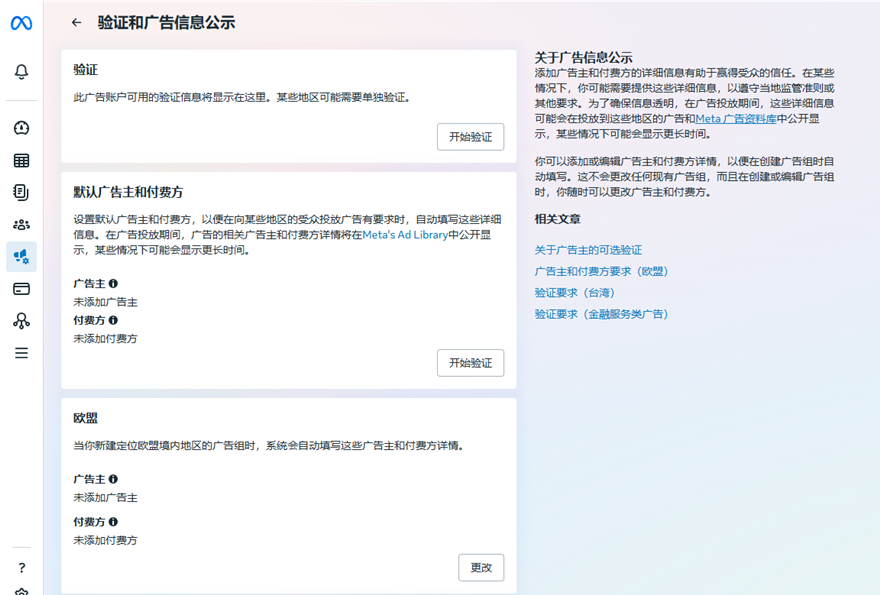
Note that setting a default Beneficiary and Payer applies only to newly created ad sets—re-open and re-select the verified entity on any older draft ad sets that failed prior to approval. See our Advertiser Verification service overview for supported region setups.
What should you clean up before submitting a Meta review request?
Because Meta typically grants only a narrow window for manual review, complete these four checks before clicking Request Review:
- Remove rejected or borderline creatives: Delete ads using before-and-after imagery, exaggerated income/health claims, trademarked logos, or personal attributes ("Are you struggling with...?").
- Audit the landing page: Confirm HTTPS loads cleanly, privacy policy / refund / contact pages are visible, and there are no broken redirects or aggressive pop-ups.
- Clear billing issues: Resolve failed card authorizations, mismatched billing names, or overdue balances in Payment Settings.
- Keep the appeal concise and factual: Explain your legitimate business model, confirm which items you reviewed and cleaned up, and attach matching government ID or business registration documents only when Meta requests them.
For teams comparing restored profiles versus fresh assets in their backup architecture, see our Reinstated / Unlocked Accounts overview and Facebook Business Manager Guide.
Official Meta References
Verified against Meta Business Help Center documentation (2026-11-27):
Platform rules and screens change over time. For appeals, verification and similar steps, follow the latest guidance in the Facebook Help Center and Meta Business Help Center.
- Reinstated accounts (2x / 3x)Accounts with lifted restrictions, set up by registration year, country and use
- Advertiser verificationHelp completing the advertiser verification each region requires, with your own details
- Spend-limit ad accountsAd accounts sorted by daily spending limit: low, high and unlimited
- BM ad accountsAd accounts managed in a BM, with access assigned per member